
Dootalk:AI Chat
M COYLE LLCEntertainment
4.8611.00 Reviews
- Version
- 1.0.4
- Installs
- 500.00K
- Age Rating
- Mature 17+
Screenshots

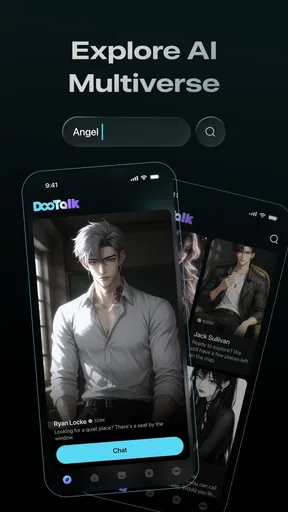
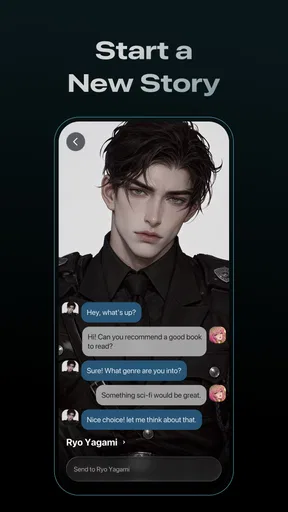
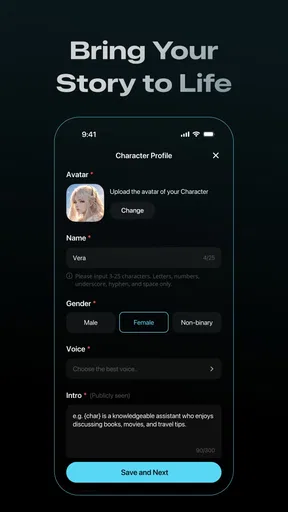
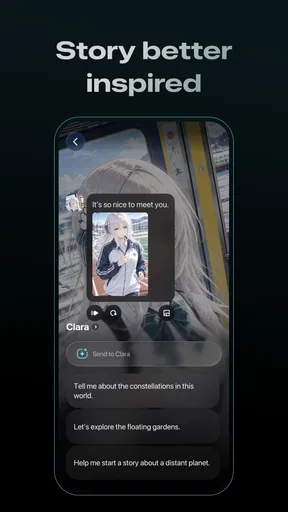
Our Review of Dootalk:AI Chat
 Analysis by Appyee
I approached Dootalk: AI Chat as an entertainment app rather than a replacement for a search engine, messaging service, or professional support tool. Its appeal is simple: it is designed for warm, natural conversations with an AI, which makes it easy to open when I want company, a little encouragement, or a low-pressure way to explore an idea. That focus gives it a more personal feel than many utility-oriented chat tools, but it also means the quality of the experience depends heavily on how clearly I guide each conversation and how realistic my expectations are.
Developed by M COYLE LLC, the app is free to download and aimed at mature users. It has built a noticeable audience, with more than half a million installs and an average rating of 4.8 from roughly eighteen thousand ratings. Those figures suggest that the central idea works for many people, although they should not be mistaken for a guarantee that every conversation will feel equally useful or natural.
Getting past the first points of friction
The first thing I would tell a new user is not to judge the app after sending one vague message. A conversational AI needs direction, especially when the goal is something more specific than casual chatting. “Talk to me” may produce a pleasant opening, but it gives the system very little to work with. I had a more dependable experience when I explained the mood I wanted, the subject I had in mind, and the kind of reply I preferred.
For example, a request such as “I have had a stressful day; keep me company and ask one gentle question at a time” is more useful than a broad greeting. It establishes pace and tone without making the exchange feel like a formal instruction sheet. If I wanted brainstorming instead, I could say that I wanted several unusual ideas followed by a short comparison. This small change turns a general chat into a more purposeful session.
Another common sticking point is expecting the app to understand an unspoken personal history immediately. Even a warm conversational system can lose context, misunderstand a reference, or respond too generally when a conversation becomes complicated. I found it better to restate the important detail briefly rather than repeatedly asking the app to remember something that was never clearly established in the current exchange.
The mature age rating is also worth taking seriously. This is not an app I would casually hand to a child, and I would not treat an AI conversation as automatically suitable for every sensitive subject. A friendly tone can make a response feel trustworthy even when it is only an automated answer. I would keep private identifying details out of the chat and use ordinary judgement before acting on advice involving health, money, relationships, or safety.
A smoother first session
My preferred starting routine is deliberately short. I open with the purpose of the conversation, add the tone I want, and state any limit that matters. “Help me think through a difficult conversation, but do not write the message yet” is a better starting point than immediately asking for a perfect answer. It lets me use the app as a thinking partner rather than handing over the entire decision.
When a reply feels off, I do not restart straight away. I first correct the specific problem: “That is too cheerful,” “Please be more direct,” or “Ask me questions instead of giving solutions.” This is one of the more useful habits with Dootalk because conversational correction is often faster than trying to formulate a completely new prompt. If the next response still misses the point, then I start a fresh exchange with a cleaner explanation.
Users also need to separate a conversational problem from a technical problem. A reply that misunderstands an ambiguous request is not necessarily an app failure. On the other hand, a screen that does not respond, a message that does not send, or a conversation that repeatedly fails to load deserves a different troubleshooting approach. Mixing these two situations leads to unnecessary frustration.
Simple checks before blaming the app
If Dootalk appears stuck, I begin with the ordinary checks: I confirm that the device is connected, move between Wi-Fi and mobile data if possible, and reopen the app. I also make sure the installed version is current; the listed release is 1.0.4, and version mismatches can create avoidable behavior differences. These steps are basic, but they are useful because they quickly distinguish a temporary connection issue from a problem with the conversation itself.
The app supports devices running Android 7.0 or later, so compatibility is another practical checkpoint for Android users. A device can technically meet that requirement and still feel slow if it is older, crowded with background activity, or short on available storage. I would close demanding apps, restart the phone, and try again before assuming that the AI service is unavailable.
If a particular message causes trouble, I would try sending a shorter version without unusual formatting, a long block of pasted text, or several requests at once. This is not a promise that every failure has a local fix, but it is a sensible way to isolate the trigger. Testing a simple greeting after a failed complex request can reveal whether the issue is the connection, the session, or the content of that one message.
It is also helpful to avoid tapping repeatedly when a response seems delayed. Multiple taps can make it harder to tell whether the original request is still processing or whether several attempts have been queued. I prefer to wait briefly, leave the screen once, and reopen the conversation only if the interface clearly remains unresponsive. That approach reduces duplicate messages and keeps the exchange easier to follow.
Recovering a conversation without losing its purpose
When a chat wanders, I use a compact reset message rather than continuing to correct every sentence. I summarize the goal in one line, identify the last useful point, and specify the next action. For instance: “We are planning a calm reply to a friend. Keep the context that I felt ignored, and give me three tones to choose from.” This kind of recovery is especially effective when the conversation has accumulated jokes, side questions, and partial ideas.
A second useful technique is to divide a large request into stages. I might ask Dootalk to list the issues first, then compare possible approaches, and only afterward help me phrase a response. This reduces the chance of receiving a polished answer that solves the wrong problem. It also gives me natural checkpoints where I can correct the direction before investing more time.
I would not use one long conversation as a permanent diary. Even when the exchange feels personal, an AI chat is better treated as a temporary workspace for a defined purpose. If a detail is important, I keep my own note and bring back only the context needed for the next session. That workflow is more reliable than assuming every earlier statement will remain available or be interpreted exactly as I intended.
There is a subtle trade-off here. More context can make the replies feel more tailored, but too much context can bury the request. I get better results by presenting the relevant facts in a short sequence and telling the app what to do with them. This is particularly useful for emotional conversations, where a long unstructured message may contain several different needs: listening, reassurance, analysis, and a practical plan.
Everyday situations where the format makes sense
One realistic use is the quiet gap after work or study, when I want to sort out my thoughts before talking to another person. I can describe the day, ask the app to identify the main concern, and then decide whether I need comfort, a plan, or simply a distraction. That is where the warm-conversation angle feels more relevant than a conventional productivity assistant. The value is not necessarily a brilliant answer; sometimes it is having a structured way to turn a vague feeling into a clear next step.
I also see a use for low-stakes rehearsal. Before making a difficult phone call, I can ask for possible reactions and practice responding to them. I would treat the output as preparation, not prediction. Real people may react differently, and the app cannot know the relationship, history, or body language involved. Still, rehearsing several possibilities can make the actual conversation feel less intimidating.
Another less obvious workflow is creative decompression. Instead of asking for a finished story or a complete list of ideas, I can use the chat to challenge a premise, change the mood of a scene, or find questions that expose a weak concept. The conversational format works well here because I can react to one suggestion at a time. It is less useful when I need precise research, citations, or dependable current facts.
For someone who lives alone or spends long periods without casual conversation, the app may offer a convenient social-feeling pause. I would keep that benefit in perspective. It can provide interaction, but it does not replace a trusted friend, a therapist, or a real community. If using it starts to feel like avoiding every human conversation, that is a sign to change the role it plays rather than increasing reliance on it.
Knowing when Dootalk is not the cause
Not every disappointing exchange is a technical defect. AI systems can produce replies that sound confident while missing the emotional point, flattening a complicated situation, or offering advice that is too generic. In those cases, changing the wording may help, but there is also a limit to what a conversational app can understand. A human who knows the situation may be the better choice, particularly when empathy, accountability, or shared history matters.
I would also choose a different type of app when the task requires dependable external information. Dootalk’s entertainment focus makes it suitable for conversation, reflection, role-play, and idea development. It is not my first choice for checking a legal obligation, diagnosing a symptom, managing an investment, or confirming a time-sensitive event. For those needs, I would use an authoritative source or a specialist service and treat any AI output only as a starting point for questions.
The same distinction applies to privacy-sensitive subjects. I would avoid entering passwords, financial account details, precise location information, or identifying details about another person. Even when a conversation feels private and informal, the safest habit is to describe the situation in general terms. That usually gives the app enough context to help without turning a casual chat into a record of sensitive information.
Cost is another point to consider. The app itself is free, but optional purchases range from $2.99 to $144.99 per item. I would check the purchase screen carefully before confirming anything, particularly if I am only experimenting with the free experience. The wide range means a curious user should not assume that every capability or extended use will remain free, and anyone managing a family device should be mindful of purchase controls.
How it compares with familiar alternatives
Compared with a standard messaging app, Dootalk offers immediate conversation without requiring another person to be available, but it cannot provide genuine mutual experience or personal responsibility. Compared with a general AI assistant, its strongest distinction is the emphasis on a warmer conversational atmosphere rather than a purely task-focused exchange. That can make it more inviting for reflection, but a productivity-oriented tool may be better for structured documents, research workflows, or detailed technical work.
Compared with entertainment based on videos, music, or games, the app asks for more participation. I have to guide the exchange, correct its tone, and decide when the conversation has reached a useful stopping point. In return, the experience can feel more responsive to my mood than passive content. Someone looking for instant distraction may prefer a game or streaming service; someone who wants to talk through an idea may find the chat format more rewarding.
The rating of 4.8 across about eighteen thousand ratings is encouraging, and the app has over five hundred thousand installs, but popularity does not remove the need to test personal fit. Some people will enjoy the gentle back-and-forth immediately. Others may find AI warmth artificial, repetitive, or less satisfying than a real conversation. I would decide based on how the app handles my own prompts, not solely on its public reception.
My practical verdict
After using it as a conversational companion, I see Dootalk: AI Chat as a focused entertainment app for people who want a friendly AI exchange with a little more emotional texture than a bare question-and-answer tool. Its best moments come when I give it a clear role: listener, brainstorming partner, rehearsal partner, or guide through a small decision. The experience becomes less convincing when I expect it to know unstated context, provide professional judgement, or replace human support.
The setup is straightforward, but the quality depends on habits that are easy to overlook: describe the tone, split complicated requests into steps, reset drifting conversations, and distinguish a failed message from an unsatisfying answer. Those practices are more valuable than chasing a perfect opening prompt. They also make it easier to tell whether the app genuinely suits me or whether I simply need a different kind of tool.
I would recommend trying the free version for short, clearly defined sessions before considering any optional purchase. Keep sensitive information general, remember the mature age rating, and use outside expertise for high-stakes decisions. If what you want is a low-pressure place to think aloud, rehearse a conversation, or fill a quiet moment, Dootalk is worth exploring. If you need factual authority, deep personal understanding, or real human connection, I would choose another option and keep this app in a smaller supporting role.
Verdict
Strengths of Dootalk:AI Chat
- Quick AI replies for everyday questions and brainstorming
- Simple chat interface that is easy for first-time users
- Useful for drafting messages, captions, and short text
- Convenient mobile access for on-the-go conversations
- Can help explain complex topics in a more approachable way
Limitations of Dootalk:AI Chat
- Answer quality may vary depending on the prompt and topic
- Some features may require a subscription or in-app purchase
- AI responses can occasionally include inaccurate information
- Privacy details should be checked before sharing personal data
- Extended conversations may lose context or repeat earlier points
Similar Picks in This Category
View All
Google Play Games
Google LLC3.9

Netflix
Netflix, Inc.4.8

YouTube Kids
Google LLC4.2

Disney+
Disney4.4

Prime Video
Amazon Mobile LLC4.7

Steam
Valve Corporation3.2
Frequently Asked Questions
What is Dootalk: AI Chat, and what can I use it for?
Dootalk: AI Chat is an AI-powered conversation app designed for asking questions, generating ideas, getting writing assistance, and having interactive chats. During testing, it felt most useful for quick explanations, brainstorming, rewriting text, and casual conversations. It should be treated as a helpful digital assistant rather than a replacement for professional advice, especially for medical, legal, financial, or other sensitive topics.
Does Dootalk: AI Chat require an account or an internet connection?
Availability of specific features may depend on the version of the app and the developer’s current requirements, but AI chat services generally need an active internet connection because requests are processed online. Some versions may also ask users to sign in before accessing conversations or premium tools. Before downloading, check the app-store listing for account requirements, supported regions, and whether guest access is available.
Is Dootalk: AI Chat free to download and use?
The app may be free to install while offering optional in-app purchases, subscriptions, usage limits, or premium features. Users should carefully review the pricing screen before starting a trial, particularly the renewal terms and billing frequency. Free access can also be limited by the number of messages, response speed, available AI models, or other restrictions that may change with future updates.
Can I trust the answers provided by Dootalk: AI Chat?
Dootalk: AI Chat can produce useful and convincing responses, but its answers are not guaranteed to be accurate. Like other AI assistants, it may misunderstand a question, provide outdated information, or confidently generate incorrect details. Verify important claims with reliable sources, avoid sharing confidential information, and never rely on the app alone for decisions involving health, safety, money, legal matters, or personal security.
What privacy considerations should I know before using Dootalk: AI Chat?
Before starting conversations, review the app’s privacy policy and the data-safety information shown in the Google Play Store or Apple App Store. Avoid entering passwords, payment details, identity documents, private client information, or other sensitive data unless you clearly understand how chats are stored and used. Also check whether conversations can be deleted and whether account or analytics data is collected.
